What's in a Tree?
What's with a Tree?
Chapter six started the implementation of a little language with expressions and control structures which concluded with first-order functions in chapter eight. Chapter seven contained a short section on type-checking. Overall, the discussion focussed on semantic analysis and code generation as part of syntax analysis, i.e., carried out by the actions called when grammar rules were completed.
This approach is called one-pass compilation because the source program is immediately rewritten in the target language — it is not converted to an intermediate representation to be processed more than once. One-pass compilation should require less time and memory but the resulting code might not be as performant.
This chapter explores a different approach: the source program is represented as a tree and visitors take care of type-checking and code generation. The result is much better separation of concerns and reusability of the components. Base classes provide infrastructure for tree building and visiting. Mix-ins implement tree-building actions for recognition and tree-processing methods for visitors and are used to allow selective sharing of methods.
Classes and Mix-Ins
Classes can be extended by adding or overriding methods.
If a method m() exists in both, the original superclass,
and the subclass resulting from extending the superclass,
the subclass method can call the superclass method as super.m(),
i.e., overriding a method does not discard it's code.
Mix-ins are functions which conceptually add methods to classes:
const Mix = superclass => class X extends superclass {
  hello () { console.debug('hello world', super.constructor.name); }
};
try       { new class A { } () . hello(); }
catch (e) { console.log(e.message); }
finally   { new (Mix(class A { })) () . hello ();
            new (Mix(Mix(class A { }))) () . hello(); }
This code produces the following output:
(intermediate value).hello is not a function
hello world A
hello world
- Class
Ahas no methodhello()(code lines 4 and 5, output line 1). Mix(classA{})creates a class which hasAas the superclass and has the methodhello()(code line 6, output line 2).- Mix-ins can be cascaded.
Mix(Mix(classA{}))creates a subclass of the subclass created byMix(classA{})and these subclasses have no names (code line 7, output line 3).
The point is that mix-ins can be applied to "add" methods, but there is no extra code if the mix-ins are not applied, i.e., mix-ins can be used to group functionality which can optionally be added to a class. Once added it will be inherited.
The code above shows that JavaScript does not need language elements to specifically support mix-ins. There are different ways to implement such a feature. The technique shown above is taken from a paper by Justin Fagnani.
The examples in this chapter are largely cumulative. To avoid repetition, the practice page includes a module Eleven which contains all classes and mix-ins defined and used in the examples in this chapter. They are summarized in appendix D. The methods can be seen in the method browser.
Building a Tree
Chapter four looked at the arithmetic expression
1 - (2 + - 3)
which can be represented, e.g., by the following tree:
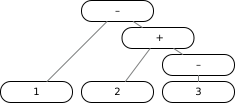 |
In JavaScript this tree can be represented using nested lists as follows:
[ 'subtract',
  [ 'number', 1 ],
  [ 'add',
    [ 'number', 2 ],
    [ 'minus',
      [ 'number', 3 ] ] ] ]
Each node of the diagram is an Array in JavaScript.
The first element of each array is a tag, represented as a string with lower-case letters.
The remaining elements are values and, in particular,
further nodes represented as arrays.
Using Recursive Descent
Example 11/01 shows that it is relatively easy to create a tree for a list of arithmetic expressions.
- The very first button should show . If not, click it until it does.
- Press to represent and check the grammar and
- press to see the tree which is built for the list of expressions in the .
Given the rules
number: Number;
term: number | '(' sum ')';
signed: [ '-' ] term;
the corresponding tree-building action methods would be something like
number (number) { return [ 'number', parseInt(number, 10) ]; }
term (...val) { return val.length == 1 ? val[0] : val[1] }
signed (minus, term) { return minus ? [ 'minus', term ] : term; }
and left associativity can be handled with an iteration in the grammar
product: signed [{ multiply | divide }];
multiply: '*' signed;
divide: '/' signed;
and by creating lists with "holes"
multiply (x, right) { return [ 'multiply', null, right ]; }
divide (x, right) { return [ 'divide', null, right ]; }
and assembling them with reduce() from left to right as follows:
product (signed, many) { return (many ? many[0] : []).
  reduce((product, alt) => (alt[0][1] = product, alt[0]), signed);
}
Building a Tree for Arithmetic
Build is the base class
for the tree builders created in this chapter:
class Build {
  /** Sets the property */
  constructor (parser) { this.parser = parser; }

  /** Tags node with source position as `.lineno` if available. */
  _lineno (node) {
    if (this.parser.current && this.parser.current.lineno)
      node.lineno = this.parser.current.lineno;
    return node;
  }
}
Build provides access to the parser (line 3 above),
e.g., for error reporting and access to the source line numbers.
If errors are detected when trees are processed
the error messages should refer back to the source program.
Therefore, _lineno()
tries to add a property .lineno to a tree node (line 8)
which references the current source seen by the parser during tree building.
BuildRD() is a mix-in which contains the actions
to build a tree for arithmetic expressions
based on the recursive descent grammar
shown in the previous section.
Combined as Build_RD(Build),
the superclass Build
and the mix-in Build_RD()
result in the subclass which
should be handed to the parse() method.
Example 11/01 uses the trick introduced in chapter six to accomplish this:
(() => {  // define and immediately use an anonymous function
  class Build { ... }
  const Build_RD = superclass => class extends superclass { ... };
  return Build_RD(Build);
}) ()
The class and mix-in definitions are placed into an anonymous function
where return delivers the actual class for parse() (line 4 above)
and the anonymous function is called immediately after being defined (line 5).
- The very first button should show . If not, click it until it does.
- Press to represent and check the grammar and
- press to see the tree which is built for the expression in the .
- Replace the entire text in the by
Eleven.Build_RD(Eleven.Build)to import the builder class from the module Eleven and repeat the steps.
Using Precedences
The LL(1) grammar for arithmetic expressions has to use iterations and nested rules so that the resulting tree reflects the expected associativities and precedences. Instead, example 11/02 uses explicit precedences and an ambiguous, very recursive grammar:
%left '+' '-';
%left '*' '/';
%right '**';
%right Number;

expr:     add | subtract | multiply | divide | power
          | minus | '(' expr ')' | number;
add:      expr '+' expr;
subtract: expr '-' expr;
multiply: expr '*' expr;
divide:   expr '/' expr;
power:    expr '**' expr;
minus:    '-' expr %prec Number;
number:   Number;
- the very first button should show . If not, click it until it does.
- Press to represent and check the grammar and
- press to see the tree which is built for the expression in the .
- Delete the code in the and compare the previous output to the nested lists which are built without the actions — these lists represent the same nesting and information but would be much harder to process again.
Using an SLR(1) grammar with precedences hugely simplifies the class actions for building, e.g.,
const Build_Number = superclass => class extends superclass {
  expr (...values) { return values.length > 1 ? values[1] : values[0]; }
  add (a, x, b) { return this._lineno([ 'add', a, b ]); }
    ...
};
The anonymous function pattern can be reused from the previous example:
(() => {  // define and immediately use an anonymous function
  const Build_Number = superclass => class extends superclass {
    ...
  };
  return Build_Number(Eleven.Build);
}) ()
The advantage of using mix-ins is that Build_Number(Eleven.Build) only contains
methods which match the structure of the SLR(1) grammar, i.e.,
if the grammar is changed, only the corresponding mix-ins
has to be adapted. Build actions very closely match their rules.
In spite of different parsers, different grammars, and different actions, both examples, 11/01 and 11/02, build the same trees for sentences which are recognized by both grammars. This means that code for further processing of the trees can be shared.
Visiting a Tree
Visitors are objects which apply algorithms such as evaluation, type-checking, code-generation, etc., to data structures such as a tree constructed by the action methods described in the previous section. Visitors can be used to separate concerns in a way very similar to the interplay between grammar rules and actions.
Example 11/03 implements expression evaluation using a visitor.
Visit is the base class for visitors:
class Visit {
  trace = false;      // RegExp selects tags to display

  visit (node, trace) {
    if (trace instanceof RegExp) this.trace = trace;
    // not a list: return it
    if (!(node instanceof Array)) return node;
    // visit
    let result;
    const show = this.trace instanceof RegExp &&
      this.trace.test(node[0]) ? this._dump(node, 0) : false;
    try {
      return result = this.constructor.prototype[node[0]].call(this, node);
    } finally {
      if (show) puts(show, 'returns', this._dump(result, 1));
    }
  }
The most important method is visit().
It is called to apply the visitor's algorithm to a node.
An optional parameter can turn on tracing
by setting the .trace property (line 7 above) to make the setting permanent.
The node argument should be an Array, otherwise it is simply returned (line 9).
A "real" node, i.e., an Array, contains a tag as first element
which is used to select a method of the visitor (line 15).
The method is called with the node as the only argument
and the result is returned.
There can be tracing, depending on the node's tag
and the setting of the property .trace (line 13).
The method might change the contents of the node;
therefore, part of the display is computed before the method is called (line 13)
and it is shown together with the result returned by the method (line 17).
Visit has a few more methods.
_tree() acts as an assertion.
It recursively walks a tree, nodes before subtrees, and checks if there are methods for all the node tags.
If not it throws an error message.
  _tree (node) {                  // recursively validates a tree
    if (!(node instanceof Array)) return;
    if (!node.length) throw 'empty node';
    if (typeof node[0] != 'string') throw 'node tag is not a string';
    if (!node[0].length) throw 'empty node tag';
    if (node[0] == 'visit') throw "'visit' cannot be a tag";
    if (typeof this.constructor.prototype[node[0]] != 'function')
      throw node[0] + ': unknown node tag';
    node.slice(1).forEach(node => this._tree(node));
  }
_dump() recursively converts a tree into a string
— up to a certain depth. If the argument is not a tree it is decoded (line 2 below).
Otherwise the tag and — depending on depth — the other entries are shown (line 10).
If present as .lineno, the source line number is appended to the node display (line 12).
Similarly, information from .type would be shown (line 13).
  _dump (node, shallow = -1) {    // recursively dumps a tree
    if (!(node instanceof Array))
      switch (typeof node) {
      case 'boolean':
      case 'number': return node;
      case 'string': return "'" + node.replace(/(['\\\n])/g, "\\$1") + "'";
      default:       return typeof node;
      }

    let result = '[ ' + (!shallow ? this._dump(node[0]) :
      node.map(item => this._dump(item, shallow - 1)).join(' ')) + ' ]';
    if ('lineno' in node) result += '.' + node.lineno;
    if ('type' in node) result += ':' + node.type;
    return result;
  }
Finally, _error()
is used to report and count errors during a visit:
  errors = 0;         // counts calls to _error()

  _error (lno, ... s) {
    if (typeof lno == 'number' && lno > 0) lno = `line ${lno}:`;
    else lno = s.splice(0, 1)[0];
    puts(`error ${++ this.errors}: ${lno}`, ... s);
  }
};
Methods such as _tree(),
_dump(),
and _error()
should not be mistakenly used for node tags; therefore, these "private"
method names start with an underscore.
Because of it's importance for the concept,
visit() is a deliberate exception to this convention.
Interpreting Arithmetic Expressions
With the infrastructure provided by Visit,
interpretation of an arithmetic expression amounts to a traversal
of the tree, i.e., evaluation visits to the subtrees
before an operation specific to a node is applied:
const Eval_Number = superclass => class extends superclass {
  add (node) { return this.visit(node[1]) + this.visit(node[2]); }
  subtract (node) { return this.visit(node[1]) - this.visit(node[2]); }
  multiply (node) { return this.visit(node[1]) * this.visit(node[2]); }
  divide (node) { return this.visit(node[1]) / this.visit(node[2]); }
  power (node) { return this.visit(node[1]) ** this.visit(node[2]); }
  minus (node) { return - this.visit(node[1]); }
  number (node) { return this.visit(node[1]); }
};
Each node has a tag defining the operation and one or two operand values or subtrees which have to be evaluated first. In the implementation shown above the evaluation order for the subtrees is defined by the implementation language, i.e., strictly left-to-right for JavaScript. This could be changed by temporarily storing the second subtree value in a local variable in each method.
Main Program
The mix-in Main() contains action methods which let new top-level rules for the grammar do the job of a main program — at the expense of not discarding the parser first. Here are the new rules, start rule first:
run:      main;
main:     dump;
dump:     expr;
expr:     add | subtract | ... ;
The action for dump will display and return the tree built by expr:
const Main = (superclass, ...args) => class extends superclass {
  dump (tree) {
    puts(new Visit()._dump(tree));
    return tree;
  }
The action for main (discussed below) arranges for one or more visits to the tree
and returns the last visit — in this case expression evaluation —
as a parameterless function
and the action for run executes this function and returns the result:
run (funct) { return funct(); }
The rules for dump or run can be omitted
and the other rules adjusted if there is no need to display the tree
or if main is expected to create an executable which can be run more than once.
Classes or mix-ins for visitors can be imported or
the anonymous function pattern in the
can be used to define them.
The call on the mix-in Main()
determines in which order the visitors are applied:
(() => {  // define and immediately use an anonymous function
  // base class with visitor methods
  class Visit {
    ...
  }
  // mix-in for expression evaluation
  const Eval_Number = superclass => class extends superclass {
    ...
  };
  // mix-in with top-level actions, runs visitors
  const Main = (superclass, ...args) => class extends superclass {
    dump (tree) { ... }
    main (tree) { ... }
    run (funct) { ... }
  };
  // result of anonymous function
  return Main(Eleven.Build_Number(Eleven.Build), // builder actions
    Eval_Number(Visit),                       // evaluation visitor
    /./);                        // node selector for trace, if any
}) ()
The action for main
depends on a closure over extra arguments
of the mix-in Main().
...args consists of one or more visitor classes (lines 11 and 18 above)
and optionally one regular expression to control tracing (line 19).
The last visit, if any, is returned as a function:
  main (tree) {
    let [lastVisitor, lastTree, trace] = this._doVisits(tree, args);
    return () => lastVisitor.visit(lastTree, trace);
  }
The private method _doVisits() is called with a tree
and a list of extra arguments to consume.
It returns a list containing the last visitor object,
the tree to apply it to, and the tracing expression, if any:
  _doVisits (tree, args) {
    let trace;                     // (first) trace pattern, if any
    const visitors = args.filter(arg => {        // remove patterns
        if (!(arg instanceof RegExp)) return true;
        if (!trace) trace = arg;
        return false;
      }),
      tail = visitors.splice(-1, 1);        // last visitor, others
    if (!tail.length) throw 'main: no visitors';
    let caller;          // each visitor is constructed with caller
    [tree, caller] = visitors.reduce(([tree, caller], Visitor) => {
      const visitor = new Visitor (caller);  // create next visitor
      visitor._tree(tree);                         // validate tree
      tree = visitor.visit(tree, trace);                   // visit
      if (trace) { puts(visitor._dump(tree)); }    // trace, if any
      if (visitor.errors) throw `${visitor.errors} error(s)`;
      return [tree, visitor];            // done; next visit if any
    }, [tree, this]);                // first caller is the builder
    const lastVisitor = new tail[0](caller); // last visitor object
    lastVisitor._tree(tree);                       // validate tree
    return [ lastVisitor, tree, trace ];
  }
First the arguments are split into a trace pattern, if any, a list of all but the last class, if any, and the last class (lines 2 to 9 above). One after another, a visitor is created from a class, each incoming tree is checked and visited, and each resulting tree is shown if requested (lines 11 to 15). The last (or possibly only) visitor is created, the last tree is checked, and the visitor, tree, and trace pattern are returned (lines 19 to 21).
- the very first button should show . If not, click it until it does.
- Press to represent and check the grammar and
- press to see the tree which is built for the expression in the , followed by the result of interpreting the expression.
- Remove the
runrule, - press to represent and check the new grammar,
- press to see the tree, and
- press to interpret.
- Remove the
dumprule, adjust themainrule, and repeat the steps. - Finally, add a regular expression such as
/./to the call toMain()near the end of the to trace interpretation.
Representing a Little Language
Example 11/04 adds variable names, comparisons, control structures, and a few other statements to the grammar:
%nonassoc '=' '<>' '>' '>=' '<' '<=';
%left     '+' '-';
  ...
stmts:    stmt [{ ';' stmt }];
stmt:     assign | print | loop | select;
assign:   Name '=' expr;
print:    'print' expr [{ ',' expr }];
loop:     'while' expr 'do' stmts 'od';
select:   'if' expr 'then' stmts [ 'else' stmts ] 'fi';

expr:     eq | ne | gt | ge | lt | le
          | add | ... | number | name;
eq:       expr '=' expr;
  ...
le:       expr '<=' expr;
add:      expr '+' expr;
  ...
name:     Name;
Comparisons have lower precedence than arithmetic operators (line 1 above)
and — different from JavaScript — are not associative, i.e., they cannot be chained.
They are added to the rule for expressions (line 11).
Any expression can be the condition for a while loop (line 8) or an if statement (line 9)
— this will be restricted later with type checking.
A name can be a term in an expression (line 12).
It can be used in an assignment statement
(line 6).
Tree building reuses Build_Number() to support arithmetic expressions
and add the mix-ins
Build_Cmps() for comparisons,
Build_Stmts() for statements, and
Build_Names() for names.
Comparisons are represented just like arithmetic operations:
const Build_Cmps = superclass => class extends superclass {
  // eq: expr '=' expr;
  eq (a, x, b) { return this._lineno([ 'eq', a, b ]); }
  ...
};
A single statement is just returned,
but a list of two or more statements is collected into one 'stmts' node:
const Build_Stmts = superclass => class extends superclass {
  // stmt: assign | print | loop | select;
  stmt (stmt) { return stmt; }

  // stmts: stmt [{ ';' stmt }];
  stmts (stmt, many) {
    return many == null ? stmt :
      this._lineno([ 'stmts',
        ...many[0].reduce(
          (stmts, alt) => { stmts.push(alt[1]); return stmts; },
          [ stmt ])
      ]);
  }
A print statement is represented as a 'print' node with a list of expression subtrees:
  // print: 'print' expr [{ ',' expr }];
  print (x, expr, many) {
    return this._lineno([ 'print',
      ...(many ? many[0] : [ ]).reduce(
        (exprs, alt) => { exprs.push(alt[1]); return exprs; },
        [ expr ])
    ]);
  }
A while loop is represented as a 'loop' node with a condition expression
and a single statement or a list of statements:
  // loop: 'while' expr 'do' stmts 'od';
  loop (w, expr, d, stmts, o) {
    return this._lineno([ 'loop', expr, stmts ]);
  }
An if statement is represented as a 'select' node with a condition
and one or two dependent statements or lists:
  // select: 'if' expr 'then' stmts [ 'else' stmts ] 'fi';
  select (i, expr, t, left, opt, f) {
    const result = this._lineno([ 'select', expr, left ]);
    if (opt) result.push(opt[1]); return result;
  }
};
In this little language, names are simply Name tokens referencing variables;
however, they could be references to functions or array elements, etc.
Therefore, tree building actions for
statements and operands involving names are collected into a separate mix-in:
const Build_Names = superclass => class extends superclass {
  // assign: Name '=' expr;
  assign (name, x, expr) {
    return this._lineno([ 'assign', name, expr ]);
  }
  // name: Name;
  name (name) { return this._lineno([ 'name', name ]); }
};
As an example, Euclid's Algorithm
x = 36; y = 54;
while x <> y do
  if x > y
    then x = x - y
    else y = y - x fi od;
print x
is represented as the following tree:
[ 'stmts'
  [ 'assign' 'x' [ 'number' 36 ] ]
  [ 'assign' 'y' [ 'number' 54 ] ]
  [ 'loop' [ 'ne' [ 'name' 'x' ] [ 'name' 'y' ] ]
    [ 'select' [ 'gt' [ 'name' 'x' ] [ 'name' 'y' ] ]
      [ 'assign' 'x' [ 'subtract' [ 'name' 'x' ] [ 'name' 'y' ] ] ]
      [ 'assign' 'y' [ 'subtract' [ 'name' 'y' ] [ 'name' 'x' ] ] ] ] ]
  [ 'print' [ 'name' 'x' ] ] ]
- the very first button should show . If not, click it until it does.
- Press to represent and check the grammar and
- press to see the tree.
- Change the grammar so that assignment uses a
namereference rather than aNametoken. How does the tree change and what would be the consequence for evaluation? - Add a start rule to
dumpthe resulting tree with line numbers and use the mix-inEleven.Main()to provide the action.
Interpreting a Little Language
Example 11/05 reuses
Eleven.Main() for the top-level rules
and the classes and mix-ins discussed so far for the build actions
and to interpret arithmetic expressions.
It adds new mix-ins
Eval_Cmps() to interpret comparisons,
Eval_Stmts() to interpret statements,
and Eval_Names() to interpret names with a symbol table:
(() => {  // define and immediately use an anonymous function
  // ... new mix-ins ...

  // builder and interpreter-visitor
  return Eleven.Main(Eleven.Build_Stmts(
                       Eleven.Build_Names(
                         Eleven.Build_Cmps(
                           Eleven.Build_Number(Eleven.Build)))),
                     Eval_Stmts(
                       Eval_Names(
                         Symbols(
                           Eval_Cmps(
                             Eleven.Eval_Number(Eleven.Visit))))));
}) ()
Comparisons are interpreted just like arithmetic operations with a postorder traversal, i.e., the subtrees are visited and interpreted first and then the comparison is applied:
// mix-in with comparisons
const Eval_Cmps = superclass => class extends superclass {
  // [ 'eq' a b ]
  eq (node) { return this.visit(node[1]) == this.visit(node[2]); }
    ...
};
A list of statement nodes is interpreted one by one:
// mix-in with statements and list evaluation
const Eval_Stmts = superclass => class extends superclass {
  // [ 'stmts' stmt ... ]
  stmts (node) { node.slice(1).forEach(stmt => this.visit(stmt)); }
For a 'print' node all expression subtrees are visited and interpreted
and the results are displayed together,
separated by blanks:
  // [ 'print' value ... ]
  print (node) { puts(...node.slice(1).map(value => this.visit(value))); }
A 'loop' node is interpreted by repeatedly interpreting the condition subtree
followed by the loop body subtree if the condition is true and returning as soon as
the condition is false:
  // [ 'loop' cond stmt ]
  loop (node) { while (this.visit(node[1])) this.visit(node[2]); }
A 'select' node is interpreted by evaluating the condition subtree
followed by the then subtree if the condition is true
or the else subtree if the condition is false and there is one:
  // [ 'select' cond then else? ]
  select (node) {
    if (this.visit(node[1])) this.visit(node[2]);
    else if (node.length > 3) this.visit(node[3]);
  }
};
In this little language, names are simply Name tokens referencing variables;
however, they could be references to functions or array elements, etc.
Therefore, statements and operands involving names are collected into a separate mix-in
which requires a symbol table.
The mix-in Symbols() uses a Map to store
objects with arbitrary properties as descriptions for names.
If available, this Map is imported from the preceding visitor
so that a sequence of visitors can add more information (line 5 below):
// mix-in with symbol table
const Symbols = superclass => class extends superclass {
  constructor (prev, ... more) {
    super(prev, ... more);
    this.symbols = prev?.symbols ?? new Map ();
  }

  _alloc (name) {
    let symbol = this.symbols.get(name);         // check if exists
    if (!symbol)                             // create with ordinal
      this.symbols.set(name,
        symbol = { ord: this.symbols.size + 1 });
    return symbol;
  }
};
The mix-in construction creates an anonymous class which can have an explicit constructor. If it does one has to be careful how arguments are managed — it is probably best to assume that all mix-ins along the chain receive the same set of arguments (line 3 above).
A private method _alloc()
returns a description for a name and
creates one if none exists.
Each symbol receives a property .ord which labels them in order of creation,
starting with 1 (line 12)
The mix-in Eval_Names()
can use Symbols() to interpret operations on a name:
// mix-in with name evaluation
const Eval_Names = superclass => class extends superclass {
  // [ 'name' name ]
  name (node) {
    const symbol = this._alloc(node[1]);
    if (!('value' in symbol)) symbol.value = 0;
    return symbol.value;
  }

  // [ 'assign' name value ]
  assign (node) { this._alloc(node[1]).value = this.visit(node[2]); }
};
When a reference to a name is interpreted, a description is located or created (line 5 above), initialized with zero if there is no value (line 6), and the current value is returned (line 7).
To interpret an 'assign' node
a description for the name is located or created
and the value is computed by a visit to the subtree and stored in the description.
Note that the evaluation order of the implementation language
might play a role:
should the name be defined and initialized before or after the value to be assigned is computed?
- the very first button should show . If not, click it until it does.
- Press to represent and check the grammar and
- press to create the executable.
- Press to execute; supply different values for
xandy. - Add a top-level
runrule to interpret immediately and repeat the steps. - Remove the
dumprule, adjust themainrule, and repeat the steps. - Add a regular expression such as
/./to the call toMain()to trace interpretation. - Finally, change the
so that all code is imported from module Eleven
(this just requires small changes to the
returnstatement), recompile, and execute.
Rewriting a Tree
A visitor can copy a tree or modify it in place, e.g., when type checking a program. In chapter seven it was demonstrated in example 7/02 that type checking is very similar to evaluation, with types replacing actual values. Result types are propagated from the leaves of the tree through the operator nodes to the statement nodes, and at each level the expectations are checked against the incoming types, e.g., a Boolean condition for a loop, or a string value for assignment to a variable declared with a string type. Mismatches can be reported as errors or corrected by applying implicit conversions.
Alternatively, for type inference, sets of types acceptable to operators are pushed to the leaves of the tree, pruned for literals, and act as constraints on variables.
Typed Expressions
Example 11/06 implements evaluation for expressions
which include bool, number, and string values.
The grammar is extended with the typical operations:
%left     'or';
%left     'and';
%nonassoc '=' '<>' '>' '>=' '<' '<=';
  ...
main:     expr;
expr:     or | and | eq | ... | minus | not | len | input | cast
          | '(' expr ')' | bool | number | string;
  ...
or:       expr 'or' expr;
and:      expr 'and' expr;
not:      'not' expr %prec Number;
bool:     'true' | 'false';

len:      'len' expr %prec Number;
input:    'input' [ String String ];
string:   String;

cast:     '(' type ')' expr %prec Number;
type:     'bool' | 'number' | 'string';
  ...
String is a new kind of token: a nonempty literal string value enclosed in single quotes,
with single quotes, linefeeds, and backslashes escaped by backslashes:
String: /'(?:\\['\\\n]|[^'\\\n])+'/
Extending the grammar requires a few new actions for tree building:
const Build_Bool = superclass => class extends superclass {
  // or: expr 'or' expr;
  or (a, x, b) { return this._lineno([ 'or', a, b ]); }
  ...
or(), and similarly
and() and not(),
build nodes for the Boolean operations.
It is left up to interpretation or code generation whether or not and and or are
short circuited.
  // bool: 'true' | 'false';
  bool (bool) { return this._lineno([ 'bool', bool == 'true' ]); }
};
bool() represents one of the new literals
'true' and 'false' as a 'bool' node with the corresponding raw Boolean value.
const Build_String = superclass => class extends superclass {
  // len: 'len' expr;
  len (x, b) { return this._lineno([ 'len', b ]); }
len() represents a unary operation
which computes the length of a string as a 'len' node.
  // input: 'input' [ String String ];
  input (i, opt) {
    return (opt ? opt : [ ]).
      reduce((r, s) =>
        (r.push(s.slice(1, -1).replace(/\\(.)/g, '$1')), r),
      [ 'input' ]);
  }
input() represents an input operation
with optional prompt and default strings as an 'input' node which contains the raw strings, if any,
without the enclosing quotes and without backslash escapes (line 5 above).
  // string: String;
  string (string) {
    return this._lineno([ 'string',
      string.slice(1, -1).replace(/\\(.)/g, '$1') ]);
  }
};
string() represents a String literal
as a 'string' node which contains the raw string value.
const Build_Cast = superclass => class extends superclass {
  // type: 'bool' | 'number' | 'string';
  type (type) { return type; }
  // cast: '(' type ')' expr;
  cast (l, type, r, b) { return this._lineno([ 'cast', type, b ]); }
};
Finally, cast() represents an
explicit type cast with a type name and a value subtree as a 'cast' node.
Interpreting Typed Expressions
The implementation language JavaScript has enough (and sometimes surprising) implicit type conversions so that
'2 ' == 2 && '2' * '1\\3'.length + String(true)
produces 6true.
Translated to conform to the little language grammar above, the expression
'2 ' = 2 and
  '2' * len '1\\3' +
    (string) true
is represented as
[ 'and'
  [ 'eq' [ 'string' '2 ' ].1 [ 'number' 2 ].1 ].1
  [ 'add'
    [ 'multiply' [ 'string' '2' ].2 [ 'len' [ 'string' '1\\3' ].2 ].2 ].2
    [ 'cast' 'string' [ 'bool' true ] ] ] ]
An evaluation visitor needs additional methods corresponding to the additional build actions:
const Eval_Bool = superclass => class extends superclass {
  // [ 'or' expr expr ]
  or (node) {
    return node.slice(1).reduce((result, tree) => {
      if (result) return result;  // short-circuit
      result = this.visit(tree);
      if (typeof result != 'boolean')
        this._error(node.lineno, "'or' non-boolean");
      return result;
    }, false);
  }
  ...
or(), and similarly
and() and not(),
implement the Boolean operations.
Both binary operations short-circuits evaluation;
e.g., in or()
subtrees are only visited until a true value is returned (line 5 above).
The operations are only intended for Boolean values and report typing issues
during evaluation (line 8).
  // [ 'bool' literal-value ]
  bool (node) {
    if (typeof node[1] != 'boolean')
      this._error(node.lineno, "'bool' non-boolean");
    return node[1];
  }
};
bool() evaluates one of the new literals
'true' and 'false' which the build action has already converted.
const Eval_String = superclass => class extends superclass {
  // [ 'len' expr ]
  len (node) {
    const val = this.visit(node[1]);
    if (typeof val != 'string')
      this._error(node.lineno, "'len' non-string");
    return val.length;  // undefined if not string
  }
len() implements the unary len operation
which computes the length of a string.
The result is undefined — and reported — if the subtree value is not a string.
  // [ 'string' literal-value ]
  string (node) {
    if (typeof node[1] != 'string')
      this._error(node.lineno, "'string' non-string");
    return node[1];
  }
string() evaluates a String literal
where the build action has already elaborated the backslash escapes.
  // [ 'concat' a b ]
  concat (node) {
    const vals = node.slice(1).map(this.visit.bind(this));
    if (vals.some(val => typeof val != 'string'))
      this._error(node.lineno, "'concat' non-string");
    return vals[0] + vals[1];
  }
};
The little language is going to use + to designate both, number addition and string concatenation.
Therefore,
concat() is available to interpret a 'concat'
node by interpreting the subtrees and concatenating the result.
const Eval_Cast = superclass => class extends superclass {
  // [ 'cast' type value ]
  cast (node) {
    switch (node[1]) {
    case 'bool':   return !! this.visit(node[2]);
    case 'number': return Number(this.visit(node[2]));
    case 'string': return String(this.visit(node[2]));
    default:       throw node[1] + ': not expected for cast';
    }
  }
Finally, cast() implements an
explicit type cast with a type and a value as a node.
This method relies on conversions provided by the implementation language JavaScript.
As before, builder and interpreter for typed expressions are imported or defined and combined in the :
(() => {  // define and immediately use an anonymous function
  // ... new mix-ins ...

  // builder and interpreter for typed expressions
  return Eleven.Main(Build_Cast(
                       Build_String(
                         Build_Bool(
                           Eleven.Build_Cmps(
                             Eleven.Build_Number(Eleven.Build))))),
                     Eval_Cast(
                       Eval_String(
                         Eval_Bool(
                           Eleven.Eval_Cmps(
                             Eleven.Eval_Number(Eleven.Visit))))));
}) ()
- the very first button should show . If not, click it until it does.
- Press to represent and check the grammar and
- press to see the error message
and the result
'6true'. - Finally, add a regular expression such as /./ to the call to Main()
near the end of the to trace interpretation
and try expressions like
trueor0andfalseand1to see that the Boolean operations only evaluate as far as they have to.
Checking Typed Expressions
JavaScript is dynamically typed: every value belongs to a small set of types, variables accept values of any type, and operators implicitly convert argument values so that the operation can be applied. In particular, values can be passed to functions that are not specifically designed to deal with them — often resulting in confusing runtime errors.
Statically typed languages try to avoid most implicit conversions and require that variable declarations include types. In particular, function parameters must be declared with types so that unexpected argument types can be detected during compilation.
Type checking should be part of compilation and try to ensure
that operations will only be applied to the type of values for which they are intended.
It has a choice of silently inserting suitable cast operations
or reporting errors to prevent execution.
Example 11/07 implements type checking for typed expressions
and inserts implicit conversions so that, e.g., the evaluation methods in
Eval_Bool() will only receive Boolean values
and the error message seen in example 11/06
is no longer triggered.
The semantics of the typed expressions
deliberately are defined to be different from the implementation language JavaScript,
e.g., comparisons happen in the type of the left operand,
they do not prefer the type 'number'.
The grammar for typed expressions, builder, and interpreter remain unchanged from example 11/06. Type checking is implemented as a new visitor based on a new set of mix-ins. This visitor is applied after building and before interpretation, i.e., the has the following structure:
(() => {  // define and immediately use an anonymous function
  // base class for type checking
  class Check extends Eleven.Visit { ... }

  // ... type checking mix-ins ...

  // builder, type-checker, and interpreter for typed expressions
  return Eleven.Main(Eleven.Build_Cast(
                       Eleven.Build_String(
                         Eleven.Build_Bool(
                           Eleven.Build_Cmps(
                             Eleven.Build_Number(Eleven.Build))))),
                     Check_Cast(
                       Check_String(
                         Check_Bool(
                           Check_Cmps(
                             Check_Number(Check))))),
                     Eleven.Eval_Cast(
                       Eleven.Eval_String(
                         Eleven.Eval_Bool(
                           Eleven.Eval_Cmps(
                             Eleven.Eval_Number(Eleven.Visit))))));
}) ()
- the very first button should show . If not, click it until it does.
- Press to represent and check the grammar and
- press to see the new result
false. - Add
/./as last parameter to the call toMain(), specifically to trace evaluation. - Analyze why
'2 '=2producesfalse. - Remove the type checking visitor from the call to
Main()and check out that'2 '=2now producestrue. - Consult the explanation of the JavaScript less than operator to see why.
Check, the base class for type checking,
inherits from Visit and adds a few utility methods:
// base class for type checking
class Check extends Visit {
  // [ 'bool' literal-value ] etc.
  _literal (node) {
    if (!(typeof node[1]).startsWith(node[0]))
      this._error(node.lineno, `expected ${node[0]} literal`);
    node.type = node[0]; return node;
  }
_literal() receives a node
describing a literal value,
makes sure that the literal value has the expected type (line 5 above),
notes the type in the .type property for the node (line 7),
and returns the typed node.
JavaScript passes arrays by reference.
Therefore, like all other type checking methods,
_literal()
can return the node it received and modified —
type checking can rewrite the tree in place.
  // [ tag expr ... ]
  _toType (type, node, index) {
    if (this.visit(node[index]).type != type)
      (node[index] = [ 'cast', type, node[index] ]).type = type;
    return node;
  }
_toType() ensures that a subtree returns
a specific type.
_toType() receives the type name,
a node — which it will return —
and an index selecting a subtree.
_toType() visits the subtree
to perform type checking (line 3 above).
If the subtree type is unexpected
_toType() modifies the node
by inserting a cast node on top of the subtree in place of the subtree (line 4)
— an error could be reported instead.
  // [ tag expr ... ]
  _require (type, node) {
    node.slice(1).forEach((_, n) => this._toType(type, node, n+1));
    node.type = type;
    return node;
  }
_require() receives a type name and a node
and applies _toType() to all subtrees
to ensure that they return the type.
It then notes the type in the .type property for the node,
and returns the typed node.
_require() and
_literal() implement
type checking for all operations on numbers and Boolean values:
// mix-in to check arithmetic operations
const Check_Number = superclass => class extends superclass {
  // [ 'add' expr expr ]
  add (node) { return this._require('number', node); }
  ...
  // [ 'number' value ]
  number (node) { return this._literal(node); }
};

// mix-in to check Boolean operations
const Check_Bool = superclass => class extends superclass {
  // [ 'or' expr expr ]
  or (node) { return this._require('bool', node); }
  ...
  // [ 'bool' value ]
  bool (node) { return this._literal(node); }
};
Arithmetic operations such as add return a number and
all operands have to produce numbers (line 4 above).
Logic operations such as or are defined to return bool
and the operands should produce Boolean values (line 13).
Comparisons are defined to employ the type of the left operand and return a Boolean value:
// mix-in to check comparisons
const Check_Cmps = superclass => class extends superclass {
  // [ compare expr expr ]
  _cmp (node) {
    const type = this.visit(node[1]).type;
    this._toType(type, node, 2);
    node.type = 'bool';
    return node;
  }
  // [ 'eq' expr expr ]
  eq (node) { return this._cmp(node); }
  ...
};
_cmp() uses
_toType() to convert the right operand
if necessary (line 6 above) and marks that the node returns bool (line 7).
_cmp() implements
type checking for all comparisons (line 11).
A string literal, input, and the len operation are straightforward to check:
// mix-in to check string operations
const Check_String = superclass => class extends superclass {
  // [ 'string' value ]
  string (node) { return this._literal(node); }
  // [ 'input' prompt? default? ]
  input (node) {
    node.type = 'string'; return node;
  }
  // [ 'len' expr ]
  len (node) {
    this._require('string', node);
    node.type = 'number'; return node;
  }
String concatenation is more complicated because an
'add' node should result in concatenation if a string value is involved
and in addition if two numbers are involved:
  // [ 'add' expr expr ]
  add (node) {
    const a = this.visit(node[1]), b = this.visit(node[2]);
    if (a.type != 'string') {
      if (b.type != 'string') return super.add(node);   // any  any
      this._toType('string', node, 1);               // any  string
    } else if (b.type != 'string')
      this._toType('string', node, 2);                // string any
    node[0] = 'concat';                            // string string
    node.type = 'string'; return node;
  }
};
add() overrides
Check_Number.add(), i.e.,
the mix-in Check_String() has to be applied after
the mix-in Check_Number().
add() visits both subtrees (line 3 above)
and if neither has a string value it defers to
super.add()
to handle a number result (line 5).
Otherwise, the first or second operand might have to be converted
into a string value (line 6 or line 8).
Finally, the operation is changed to 'concat' (line 9)
and the node is marked to produce a string value as result (line 10).
The mix-in Check_Cast() only has to deal with
a 'cast' node:
// mix-in to check a cast operation
const Check_Cast = superclass => class extends superclass {
  // [ 'cast' type expr ]
  cast (node) {
    this.visit(node[2]);
    node.type = node[1]; return node;
  }
};
The subtree has to be visited but the node is marked with the explicit type (line 6 above) — silently assuming that any kind of conversion is supported.
Checking a Typed Little Language
Example 11/08 implements type checking for the little language
introduced in example 11/05.
Variables have to be declared,
assignments and input statements have to respect the types,
print statements require strings,
conditions should return Boolean values,
and expressions include the Boolean, string, and cast operations
introduced in example 11/06.
The grammars of the previous examples are merged and there is a small change at the top level to handle declarations:
run:      main;
main:     block;
block:    item [{ ';' item }];
item:     dcl | stmt;
dcl:      type Name [{ ',' Name }];
type:     'bool' | 'number' | 'string';
The main action will return type checking as a function
which the action for run will execute.
A sentence consists of one or more items, separated by semicolons (line 3 above).
An item is a declaration or a statement (line 4).
A declaration starts with one of the types (line 6)
followed by one or more variable names, separated by commas (line 5).
A block is not permitted at the statement level, i.e.,
in the body of a loop or selection, but this would be the obvious hook
to add block structure as described in chapter seven.
The grammar permits declarations and statements in any order,
i.e., variables can be used before they are declared,
but the block() action will build a node which puts things in order,
declarations before statements:
// mix-in with building for 'block' and 'dcl'
const Build_Dcl = superclass => class extends superclass {
  // block: item [{ ';' item }];
  block (item, many) {
    const items = (many ? many[0] : []).reduce(
      (items, alt) => { items.push(alt[1][0]); return items; }, [ item[0] ]);
    return this._lineno([ 'block' ].concat(
      items.filter(item => item[0] == 'dcl'),
      items.filter(item => item[0] != 'dcl')));
  }
  // dcl: type Name [{ ',' Name }];
  dcl (type, name, many) {
    return this._lineno([ 'dcl', type, name ].
      concat(many ? many[0].map(alt => alt[1]) : []));
  }
};
The block() action collects all items into one list (line 5 above).
There is no action for item, i.e., the item rule will return a list with a single
declaration or statement node which block() has to extract (line 6).
The list of all items is then split into declarations (line 8) and
statements (line 9) and both are combined into a 'block' node (line 7)
because concat() flattens one level of arrays.
The dcl() action builds a 'dcl' node with the declared type and the list of names (line 13).
There is not much to do to check 'block' and 'dcl' nodes:
// mix-in with type checking for 'block' and 'dcl'
const Check_Dcl = superclass => class extends superclass {
  // [ 'block' dcl... stmt... ]
  block (node) {
    node.slice(1).forEach((item, n) => node[n + 1] = this.visit(item));
    return node;
  }
  // [ 'dcl' type name ... ]
  dcl (node) {
    node.slice(2).forEach(name => {
      if (this.symbols.has(name))
        this._error(node.lineno, name + ': duplicate');
      this._alloc(name).type = node[1];
    });
    return node;
  }
};
The block() method visits each subtree (line 5 above),
i.e., it executes declarations before it checks statements.
The dcl() method needs a symbols Map, e.g., from the
Symbols mix-in.
It forbids that a name has already been declared (line 11)
and creates a description with a type property (line 13).
Most statements require little checking and they have no useful node type upon return:
// mix-in with type checking for statements
const Check_Stmts = superclass => class extends superclass {
  // [ 'stmts' stmt... ]
  stmts (node) {
    node.slice(1).forEach(stmt => this.visit(stmt)); return node;
  }
  // [ 'print' expr ... ]
  print (node) { return this._require('string', node); }
  // [ 'loop' expr body ]
  loop (node) {
    this.visit(node[2]);
    return this._toType('bool', node, 1);
  }
  // [ 'select' expr then else? ]
  loop (node) {
    this.visit(node[2]);
    return this._toType('bool', node, 1);
  }
  /** `[ 'select' cond then else? ]` condition cast to `bool`.
      @param {Array} node - to check.
      @memberof module:Eleven~Check_Stmts
      @instance */
  select (node) {
    node.slice(2).forEach(node => this.visit(node));
    return this._toType('bool', node, 1);
  }
};
The stmts() method visits each subtree (line 5 above).
The print() method uses _require()
to ensure that all arguments are strings (line 8).
The loop() method visits both subtrees and uses
_toType()
to ensure that the loop condition returns a Boolean value (line 12).
The select() method visits all subtrees and uses
_toType()
to ensure that the condition returns a Boolean value (line 17).
Checking the use of variables is more complicated.
Just like dcl()
the methods in Check_Names()
require a symbols Map:
// mix-in with type checking for names
const Check_Names = superclass => class extends superclass {
  // [ 'name' name ]
  name (node) {
    node.type = this._type(node.lineno, node[1]);
    return node;
  }
  // return the type of a name, or 'number'
  _type (lineno, name) {
    const symbol = this._alloc(name);
    if (!('type' in symbol)) {
      this._error(lineno, name + ': undefined');
      symbol.type = 'number';
    }
    return symbol.type;
  }
  // [ 'assign' name expr ]
  assign (node) {
    return this._toType(this._type(node.lineno, node[1]), node, 2);
  }
};
The name() method sets the node type to the declared type of the variable (line 5 above).
It uses _type()
to obtain the type from the symbol table (line 9).
The type should have been declared!
The assign() method uses _toType()
to visit the expression subtree and ensure that the expression delivers
the type which is expected by the variable — this information is delivered by
_type().
The defines the new mix-ins discussed above
and uses Main() to create the builder and type checker:
(() => {  // define and immediately use an anonymous function
  // mix-ins with building actions
    ...
  // mix-ins with methods for type checking
    ...
  // builder and checker for a typed little language
  return Eleven.Main(Build_Dcl(
                       Eleven.Build_Stmts(
                         Eleven.Build_Names(
                           Eleven.Build_Cast(
                             Eleven.Build_String(
                               Eleven.Build_Bool(
                                 Eleven.Build_Cmps(
                                   Eleven.Build_Number(Eleven.Build)))))))),
                     Check_Dcl(
                       Check_Stmts(
                         Check_Names(
                           Eleven.Symbols(
                             Eleven.Check_Cast(
                               Eleven.Check_String(
                                 Eleven.Check_Bool(
                                   Eleven.Check_Cmps(
                                     Eleven.Check_Number(Eleven.Check))))))))));
}) ()
Example 11/08 contains a (rather contrived) typed version of Euclid's Algorithm:
x = input 'x' '36'; y = input 'y' '54'; string x; number y;
eq = x = y; bool eq;
while not eq do
  if (number) x > y then
    x = x - y
  else
    y = y - x
  fi;
  eq = x = y
od;
print 'Greatest common divisor:', x
- The very first button should show . If not, click it until it does.
- Remove the
runandmainrules, - press to represent and check the grammar, and
- press to see the original tree.
[ 'block'
  [ 'dcl' 'string' 'x' ] [ 'dcl' 'number' 'y' ] [ 'dcl' 'bool' 'eq' ]
  [ 'assign' 'x' [ 'input' 'x' '36' ] ]
  [ 'assign' 'y' [ 'input' 'y' '54' ] ]
  [ 'assign' 'eq' [ 'eq' [ 'name' 'x' ] [ 'name' 'y' ] ] ]
  [ 'loop' [ 'not' [ 'name' 'eq' ] ] [ 'stmts'
    [ 'select'
      [ 'gt' [ 'cast' 'number' [ 'name' 'x' ] ] [ 'name' 'y' ] ]
      [ 'assign' 'x' [ 'subtract' [ 'name' 'x' ] [ 'name' 'y' ] ] ]
      [ 'assign' 'y' [ 'subtract' [ 'name' 'y' ] [ 'name' 'x' ] ] ] ]
    [ 'assign' 'eq' [ 'eq' [ 'name' 'x' ] [ 'name' 'y' ] ] ] ] ]
  [ 'print' [ 'string' 'Greatest common divisor:' ] [ 'name' 'x' ] ] ]
- Note that the
blockaction has sorted the declarations before the statements. - Restore the rules,
- press to represent and check the grammar, and
- press to see the tree after it was modified by the type checker:
[ 'block'
  [ 'dcl' 'string' 'x' ] [ 'dcl' 'number' 'y' ] [ 'dcl' 'bool' 'eq' ]
  [ 'assign' 'x' [ 'input' 'x' '36' ] ]
  [ 'assign' 'y' [ 'cast' 'number' [ 'input' 'y' '54' ] ] ]
  [ 'assign' 'eq'
    [ 'eq' [ 'name' 'x' ] [ 'cast' 'string' [ 'name' 'y' ] ] ] ]
  [ 'loop' [ 'not' [ 'name' 'eq' ] ] [ 'stmts'
    [ 'select'
      [ 'gt' [ 'cast' 'number' [ 'name' 'x' ] ] [ 'name' 'y' ] ]
      [ 'assign' 'x' [ 'cast' 'string'
        [ 'subtract'
          [ 'cast' 'number' [ 'name' 'x' ] ] [ 'name' 'y' ] ] ] ]
      [ 'assign' 'y'
        [ 'subtract'
          [ 'name' 'y' ] [ 'cast' 'number' [ 'name' 'x' ] ] ] ] ]
    [ 'assign' 'eq'
      [ 'eq' [ 'name' 'x' ] [ 'cast' 'string' [ 'name' 'y' ] ] ] ] ] ]
  [ 'print' [ 'string' 'Greatest common divisor:' ] [ 'name' 'x' ] ] ]
- Remove or duplicate a declaration to see error messages from type checking.
- Change the variables' types to see how that changes what casts are inserted.
Interpreting a Typed Little Language
Example 11/09 adds the necessary methods
to interpret the typed version of the little language.
The creates the new interpreter and uses
Main() to create a new main action
which will return the interpreter as a function:
(() => {  // define and immediately use an anonymous function
  // mix-in for blocks and declarations
    ...
  // builder, checker, and interpreter for a typed little language
  return Eleven.Main(Eleven.Build_Dcl(
                       Eleven.Build_Stmts(
                         Eleven.Build_Names(
                           Eleven.Build_Cast(
                             Eleven.Build_String(
                               Eleven.Build_Bool(
                                 Eleven.Build_Cmps(
                                   Eleven.Build_Number(Eleven.Build)))))))),
                     Eleven.Check_Dcl(
                       Eleven.Check_Stmts(
                         Eleven.Check_Names(
                           Eleven.Symbols(
                             Eleven.Check_Cast(
                               Eleven.Check_String(
                                 Eleven.Check_Bool(
                                   Eleven.Check_Cmps(
                                     Eleven.Check_Number(Eleven.Check))))))))),
                     Eval_Dcl(
                       Eleven.Eval_Stmts(
                         Eleven.Eval_Names(
                           Eleven.Symbols(
                             Eleven.Eval_Cast(
                               Eleven.Eval_String(
                                 Eleven.Eval_Bool(
                                   Eleven.Eval_Cmps(
                                     Eleven.Eval_Number(Eleven.Visit))))))))));
}) ()
Most of the interpreter was developed in example 11/05
above.
Type checking adds 'block' and 'dcl' nodes.
Therefore, just two visitor methods have to be added to the interpreter:
  // mix-in to interpret 'block' and 'dcl'
const Eval_Dcl = superclass => class extends superclass {
  // [ 'block' dcl ... stmt ... ]
  block (node) {  node.slice(1).forEach(item => this.visit(item)); }
  // [ 'dcl' type name ... ]
  dcl (node) {
    node.slice(2).forEach(name => {
      if (this.symbols.has(name) && 'value' in this.symbols.get(name))
        this._error(node.lineno, name + ': duplicate');
      switch (node[1]) {
      case 'bool':    this._alloc(name).value = false; break;
      case 'number':  this._alloc(name).value = 0; break;
      case 'string':  this._alloc(name).value = ''; break;
      default:        this._error(node.lineno, node[1] + ": not in 'dcl'");
      }
    });
  }
The block() method simply visits the subtrees, i.e.,
the declarations followed by the statements (line 4 above).
The dcl() method initializes the variables.
The test for duplicates (line 8) should not be necessary because the interpreter
uses the symbol table which was created by the type checker,
i.e., duplicate variables would have been detected before
and Main() does not continue
from one visitor to the next if errors are reported.
Variables are initialized to "zero", but the value is type-specific (line 10).
- the very first button should show . If not, click it until it does.
- Press to represent and check the grammar,
- press to create the executable, and
- press to interpret the program.
&& 'value' in this.symbols.get(name)
- Remove the phrase above
from the body of the
dclmethod and press and again to see three error messages becausex,y, andeqare already in the symbol table. This demonstrates that the symbol table is copied from the type checker.
bool b; print b
- Change the program to the one shown above and check and interpret it.
The output should be
false. - Remove the body of the
dclmethod and check and interpret again. The output is0because there is no initialization, the reference to a name defaults a missing value to zero, and the cast to a string for printing usesString()which in JavaScript converts anything to a string.
Generating Code
Code generation for a stack machine using action methods was introduced starting in chapter six with examples 6/09 and 6/10 for arithmetic expressions and example 6/11 for control structures. If a program is represented as a tree code generators are visitors which can apply some code optimization. The stack machines can be reused and extended with new instructions, e.g., for exponentiation or to operate on strings and Boolean values.
Compiling Arithmetic Expressions
Example 11/10 implements code generation for trees of arithmetic expressions
which include exponentiation.
Code is the base class for code generators.
It extends Visit and manages stack machines.
In particular, it reuses machine generators such as Six.Machine10
and it implements an extension mechanism to add instructions:
class Code extends Visit {
  // machine generator class, allows replacement
  get Machine () { return this.#Machine ??= Six.Machine10; }
  #Machine;
  // instructions mix-in, allows extensions
  get Instructions () {
    return this.#Instructions ??= superclass => superclass;
  }
  #Instructions;
  // machine generator, should not change
  get machine () {
    return this.#machine ??= new (this.Instructions(this.Machine)) ();
  }
  #machine;
  // for 'compile' rule, overwrite to match machine generator
  get executable () { return this.machine.run(0); }
  // visit subtrees, generate 'op' instruction, returns end address
  _postfix (node, op) {
    node.slice(1).forEach(node => this.visit(node));
    return this.machine.gen(op);
  }
}
The stack machine generators in chapter six and chapter seven
form a linear inheritance hierarchy and define the machine instructions.
Code defines getters as hooks
which can be overwritten in mix-ins
to change which machine generator class will be used (line 3 above),
to add new instructions in a cumulative fashion (line 6),
and to access the executable as befits the underlying machine generator (line 16).
The private method _postfix() generates code for many operators.
Given a node, the subtrees are visited to generate code to push values
onto the runtime stack and then an instruction corresponding to the node
is generated to operate on the values (lines 19 and 20).
The mix-in Code_Number()
extends the Instructions() mix-in
to add a Power instruction (lines 3 to 11 below)
and it contains the methods to visit the trees built for arithmetic expressions:
const Code_Number = superclass => class extends superclass {
  // overwrite instructions mix-in, add 'Power'
  get Instructions () {
    return this.#Instructions ??=
      superclass => class extends super.Instructions(superclass) {
        /** `stack: ... a b -> ... a**b` */
        Power (memory) {
          memory.splice(-2, 2, memory.at(-2) ** memory.at(-1));
        }
      };
  }
  #Instructions;
  ...
  // [ 'power' a b ]
  power (node) { return this._postfix(node, 'Power'); }
  // [ 'minus' a ]
  minus (node) { return this._postfix(node, 'Minus'); }
  // [ 'number' n ]
  number (node) {
    if (typeof node[1] != 'number')
      this._error(node.lineno, "'number' non-number");
    return this.machine.gen('Push', node[1]);
  }
};
For nodes like 'power' or 'minus' _postfix()
visits the subtrees from left to right for code generation
and then generates the instruction required for the node (lines 15 and 17 above).
For a 'number' node 'Push' is generated to load a constant onto the runtime stack (line 22).
Finally, the mix-in Compile()
works exactly like the mix-in Main() discussed above:
const Compile = (superclass, ...args) => class extends superclass {
  // compile: expr;
  compile (tree) {
    const [lastVisitor, lastTree, trace] = this._doVisits(tree, args);
    lastVisitor.visit(lastTree, trace);
    if (trace) puts(lastVisitor.machine.toString());
    return lastVisitor.executable;
  }
};
It defines a build action for a compile rule which expects a tree,
runs a list of visitors such as type checking and code generation,
and returns the executable from the last visitor.
The contains the compiler for arithmetic expressions:
(() => {  // define and immediately use an anonymous function
  // mix-in to run the visitors
  const Compile ...

  // base class to generate code
  class Code ...

  // mix-in to generate code for arithmetic expressions
  const Code_Number ...

  // builder and code generator for arithmetic expressions
  return Compile(
           Eleven.Main(Eleven.Build_Number(Eleven.Build)),
           Code_Number(Code));
}) ()
Main() is needed in the inheritance chain of mix-ins
to supply _doVisits() which does the actual work for the
compile() build action.
The construction still supports dump and run rules to display the tree and
immediately run the executable returned by compile().
The grammar for this example starts with:
compile:  expr;
expr:     add | subtract | multiply | divide | power
          | minus | '(' expr ')' | number;
The precedence table,
expr,
and the remaining rules are unchanged from from example 11/02.
- the very first button should show . If not, click it until it does.
- Press to represent and check the grammar,
- press to create the executable, and
- press to execute the generated code.
- Insert
dumpbetween thecompileandexprrules to display the expression tree. - Add a regular expression such as
/./to the call toCompile()to trace code generation, i.e., display the successive last addresses and then dump code memory. - Add
runas the start rule to immediately execute the generated code:
> run = g.parser().parse(program, actions)
[ 'subtract' [ 'add' [ 'number' 1 ].1 ...
[ 'number' ].1 returns 1
[ 'number' ].1 returns 2
  ...
[ 'subtract' ] returns 20
0: memory => this.Push(1)(memory)
1: memory => this.Push(2)(memory)
  ...
19: memory => this.Subtract(memory)
[ -10 ]
Compiling a Little Language
Example 11/11 extends code generation to comparisons, variables, constrol structures, and a few other statements. It reuses the grammar and build actions from example 11/04. The contains the compiler for a little language:
(() => {  // define and immediately use an anonymous function
  // mix-in to generate stack machine code for comparisons
  const Code_Cmps = ...

  // mix-in to generate stack machine code for names
  const Code_Names = ...

  // mix-in to generate stack machine code for statements
  const Code_Stmts = ...

    // builder and code generator for a little language
    return Eleven.Compile(
             Eleven.Main(Eleven.Build_Stmts(
                           Eleven.Build_Names(
                             Eleven.Symbols(
                               Eleven.Build_Cmps(
                                 Eleven.Build_Number(Eleven.Build)))))),
             Code_Stmts(
               Code_Names(
                 Code_Cmps(
                   Eleven.Symbols(
                     Eleven.Code_Number(Eleven.Code))))));
  }) ()
Code generation for comparisons is implemented
using _postfix():
const Code_Cmps = superclass => class extends superclass {
  // [ 'eq' a b ]
  eq (node) { return this._postfix(node, 'Eq'); }
  ...
The necessary instructions were implemented in Six.Machine11
which the mix-in Code_Cmps() has to request:
  // [override] use Six.Machine11
  get Machine () { return this.#Machine ??= Six.Machine11; }
  #Machine;
This stack machine generator significantly redefines
run(),
therefore, access to the executable has to be overwritten:
  // [override] size memory, check for 'trace' variable
  get executable () {
    const trace = this.symbols.get('trace');
    return this.machine.run(this.symbols.size, 0,
      trace ? trace.ord - 1 : false);
  }
};
As a consequence, Code_Cmps() silently assumes that
the mix-in Symbols() has been included.
The mix-in Code_Names()
implements code generation for name references:
const Code_Names = superclass => class extends superclass {
  // [ 'name' name ]
  name (node) {
    return this.machine.gen('Load', this._alloc(node[1]).ord - 1);
  }
  // [ 'assign' name value ]
  assign (node) {
    this.visit(node[2]);
    this.machine.gen('Store', this._alloc(node[1]).ord - 1);
    return this.machine.gen('Pop');
  }
};
The instructions Load, Store, and Pop were implemented in Six.Machine11
and variable addresses are managed by _alloc()
which is part of the mix-in Symbols().
Generating optimized code for statements is a bit more interesting.
First, the mix-in Code_Stmts()
adds a Bnzero instruction
which pops the runtime stack and branches
if the popped value was non-zero (lines 7 to 9 below).
const Code_Stmts = superclass => class extends superclass {
  // [ extend ] add 'Bnzero' to optimize 'while' loops
  get Instructions () {
    return this.#Instructions ??=
      superclass => class extends super.Instructions(superclass) {
        /** `stack: ... bool -> ... | pc: bool? a` */
        Bnzero (a) {
          return memory => { if (memory.pop()) memory.pc = a; }
        }
      };
  }
  #Instructions;
Referring to super.Instructions ensures that the Power instruction
defined by Code_Number() remains available (line 5 above).
Code generation itself deals with 'stmts', 'print', 'select', and 'loop' nodes:
  // [ 'stmts' stmt ... ]
  stmts (node) {
    return node.slice(1).reduce((end, stmt) => this.visit(stmt), 0);
  }
  // [ 'print' value ... ]
  print (node) {
    node.slice(1).forEach(value => this.visit(value));
    return this.machine.gen('Print', node.length - 1);
  }
stmts()
visits each subtree in turn to generate code for each statement (line 3 above).
Like all of code generation it returns the end address of the generated code.
print()
visits each subtree in turn to generate code to push all values onto the runtime stack (line 7)
and then generates a Print instruction (line 8)
which will print the values together and remove them from the stack.
  // [ 'select' expr stmt stmt? ]
  select (node) {
    const a = this.visit(node[1]);         //      cond
    this.machine.code.push(null);          // a:   Bzero b
    let b = this.visit(node[2]), end = b;  //      then
    if (node.length > 3) {                 // b:end:
      this.machine.code.push(null);    //          Branch end
      end = this.visit(node[3]);           // b:   else
                                           // end:
      this.machine.code[b ++] = this.machine.ins('Branch', end);
    }
    this.machine.code[a] = this.machine.ins('Bzero', b); // fixup
    return end;
  }
select()
visits the first subtree to generate code for the condition of an if statement (line 3 above),
leaves room for a conditional branch (line 4),
and visits the second subtree to generate code for the then part (line 5).
If there is no else part there is only one repair:
the conditional branch has to bypass the then part (line 12).
Otherwise
there has to be room for an unconditional branch (line 7)
followed by the code for the else part generated by a visit to the third subtree (line 8).
In this case there are two repairs:
the conditional branch has to reach the else part (line 10)
and the unconditional branch has to bypass the else part (line 12).
Either way, select() returns the next code address (line 13).
The comments above indicate with symbolic labels such as a:, b:, etc.,
how convenient this is to generate the branch instructions
for control structures.
select()
generates the same code as example 6/11
but the tree representation collects branch address management into a single method
rather than having to distribute it over a number of rules and actions.
  // [ 'loop' expr stmt ]
  loop (node) {
    const a = this.machine.code.push(null) - 1,  // a:   Branch b
      b = this.visit(node[2]);                   // a+1: stmt
    this.visit(node[1]);                         // b:   cond
    this.machine.code[a] = this.machine.ins('Branch', b); // fixup
    return this.machine.gen('Bnzero', a + 1);    //      Bnzero a+1
  }
};
The tree representation makes it possible for loop()
to generate code for the loop body (line 4 above) ahead of the code for the condition (line 5).
An unconditional Branch instruction
is inserted before the loop body (line 6) and is executed just once to initially transfer
control to the condition.
The conditional Bnzero instruction
follows the condition (line 7) and transfers control each time back to the loop body.
If the condition is false initially it takes two branch instruction cycles (rather than one in example 6/11) to bypass the loop, but once the loop takes place almost half the branch instruction cycles are saved!
- the very first button should show . If not, click it until it does.
- Press to represent and check the grammar,
- press to create the executable for Euclid's algorithm:
trace = -1;
input x, y;
while x <> y do
  if x > y then
    trace = 1; x = x - y; trace = -1
  else y = y - x
  fi
od;
print x
- Add a regular expression such as
/./to the call toCompile()to trace code generation, i.e., display the successive last addresses and then dump code memory. - Check out the
loopoptimization:
  ...
10: memory => this.Branch(33)(memory)
11: memory => this.Load(1)(memory)      // if x > y
12: memory => this.Load(2)(memory)
13: memory => this.Gt(memory)
14: memory => this.Bzero(28)(memory)
  ... then ...
27: memory => this.Branch(33)(memory)
  ... else ...
33: memory => this.Load(1)(memory)      // while x <> y
34: memory => this.Load(2)(memory)
35: memory => this.Ne(memory)
36: memory => this.Bnzero(11)(memory)
  ...
Compiling a Typed Little Language
Example 11/12 reuses the grammar, tree building actions, and type checker from example 11/08 and extends stack machine and code generation from example 11/11 to produce the last compiler in this book. The contains the compiler for a typed little language:
(() => {  // define and immediately use an anonymous function
  // additional mix-ins to generate code for Boolean expressions
  ...
  // builder, type checker, and code generator for a typed little language
  return Eleven.Compile(Eleven.Main(Eleven.Build_Dcl(
                          Eleven.Build_Stmts(
                            Eleven.Build_Names(
                              Eleven.Symbols(
                                Eleven.Build_Cast(
                                  Eleven.Build_String(
                                    Eleven.Build_Bool(
                                      Eleven.Build_Cmps(
                                        Eleven.Build_Number(Eleven.Build)))))))))),
                        Eleven.Check_Dcl(
                          Eleven.Check_Stmts(
                            Eleven.Check_Names(
                              Eleven.Symbols(
                                Eleven.Check_Cast(
                                  Eleven.Check_String(
                                    Eleven.Check_Bool(
                                      Eleven.Check_Cmps(
                                        Eleven.Check_Number(Eleven.Check))))))))),
                        Code_Dcl(
                          Eleven.Code_Stmts(
                            Eleven.Code_Names(
                              Code_Cast(
                                Code_String(
                                  Code_Bool(
                                   Eleven.Code_Cmps(
                                     Eleven.Symbols(
                                       Eleven.Code_Number(Eleven.Code))))))))));
}) ()
The binary Boolean operations are a bit tricky: short-circuit evaluation turns them into something akin to control structures but they still have to push a value onto the runtime stack:
const Code_Bool = superclass => class extends superclass {
  // [ 'or' a b ]
  or (node) {
    this.visit(node[1]);                        //    push a
    const x = this.machine.code.push(null) - 1; // x: IfTrue y
    this.machine.gen('Pop');                    //    pop a
    const y = this.visit(node[2]);              //    push b
                                                // y:
    this.machine.code[x] = this.machine.ins('IfTrue', y); // fixup
    return y;
  }
or() generates code to evaluate the left operand (line 4 above)
and leaves room for a branch instruction (line 5).
If the left operand leaves false on top of the runtime stack,
this value has to be removed (line 6)
and there has to be code to evaluate the right operand (line 7)
which will leave the ultimate result of the or operation on the stack.
Therefore, the branch instructions IfTrue and IfFalse
should check the value on the stack but not remove it:
  // [extend] add short-circuit branches and 'Not'
  get Instructions () {
    return this.#Instructions ??=
      superclass => class extends super.Instructions(superclass) {
        /** `stack: ... bool -> ... bool | pc: bool? a` */
        IfTrue (a) {
          return memory => { if (memory.at(-1)) memory.pc = a; };
        }
        /** `stack: ... bool -> ... bool | pc: !bool? a` */
        IfFalse (a) {
          return memory => { if (!memory.at(-1)) memory.pc = a; };
        }
        /** `stack: ... a -> ... !a` */
        Not (memory) { memory.splice(-1, 1, !memory.at(-1)); }
      };
  }
  #Instructions;
and() follows the same pattern as
or() but uses IfFalse instead:
  // [ 'and' a b ]
  and (node) {
    this.visit(node[1]);                        //    push a
    const x = this.machine.code.push(null) - 1; // x: IfFalse y
    this.machine.gen('Pop');                    //    pop a
    const y = this.visit(node[2]);              //    push b
                                                // y:
    this.machine.code[x] = this.machine.ins('IfFalse', y); // fixup
    return y;
  }
The comments again illustrate the advantage of generating control structure code in a single method for a tree node.
  // [ 'not' a ]
  not (node) { return this._postfix(node, 'Not'); }
not() uses
_postfix() to
generate code to push a Boolean value onto the stack and generates Not to complement it.
  // [ 'bool' a ]
  bool (node) {
    if (typeof node[1] != 'boolean')
      throw `[ 'bool' ${node[1]} ]: not boolean`;
    return this.machine.gen('Push', node[1]);
  }
};
Finally,
bool() has a Boolean literal in the node
and generates Push
to push it onto the runtime stack.
The rest of the additional code generation for the typed little language follows the usual pattern.
cast() visits the value subtree to generate code
to push the value onto the stack (line 4 below) and generates a Cast instruction:
const Code_Cast = superclass => class extends superclass {
  // [ 'cast' type b ]
  cast (node) {
    this.visit(node[2]);
    return this.machine.gen('Cast', `'${node[1]}'`, `'${node[2].type}'`);
  }
  // [extend] add 'Cast' instruction
  get Instructions () {
    return this.#Instructions ??=
      superclass => class extends super.Instructions(superclass) {
        /** `stack: ... a -> ... cast a` */
        Cast (to, from) {
          let cast;
          switch (to + '-' + from) {
          case 'bool-number':   cast = x => !!x; break;
          case 'bool-string':   cast = x => /^\s*true\s*$/i.test(x); break;
          case 'number-bool':
          case 'number-string': cast = Number; break;
          case 'string-bool':
          case 'string-number': cast = String; break;
          default: throw `Cast ${to} ${from}: illegal cast`;
          }
          return memory =>
            memory.splice(-1, 1, cast(memory.at(-1)));
        }
      };
  }
  #Instructions;
};
The Cast instruction is added to the stack machine generator as usual (lines 8 to 28 above).
It selects one of several functions — based on on JavaScript conversions —
depending on the combination of to and from types (lines 13 to 20)
and creates an instruction which applies the selected function to the top of the
runtime stack (line 24).
The implementation verifies that the function is only applied to a value
of the intended JavaScript type (line 21).
Code generation for string nodes again uses _postfix()
but there have to be new machine instructions:
const Code_String = superclass => class extends superclass {
  // [ 'concat' value value ]
  concat (node) { return this._postfix(node, 'Concat'); }
  // [ 'len' value ]
  len (node) { return this._postfix(node, 'Len'); }
  // [ 'string' literal ]
  string (node) {
    if (typeof node[1] != 'string')
      throw `[ 'string' ${node[1]} ]: not string`;
    return this.machine.gen('Push', this._escape(node[1]));
  }
  // [ 'input' prompt? default? ]
  input (node) {
    return this.machine.gen('InputString',
      this._escape(node[1] ?? "''"), this._escape(node[2] ?? "''"));
  }
  // [extend] add 'InputString', 'Len', and 'Concat' instructions
  get Instructions () {
    return this.#Instructions ??=
      superclass => class extends super.Instructions(superclass) {
        /** `stack: ... a b -> ... a+b` */
        Concat (memory) {
          memory.splice(-2, 2, memory.at(-2) + memory.at(-1));
        }
        /** `stack: ... a -> ... a.length` */
        Len (memory) {
          memory.splice(-1, 1, memory.at(-1).length);
        }
        /** `stack: ... -> ... val` */
        InputString (prmpt, dflt) {
          return memory => memory.push(prompt(prmpt, dflt));
        }
      };
  }
  #Instructions;
concat() and
len() call
_postfix() to generate code (lines 3 and 5 above)
using the new instructions
Concat (line 22) and
Len (line 26).
It is assumed that a string requires just one memory slot, just like a number.
Therefore,
string() can use Push to push a string constant
onto the runtime stack (line 10).
Finally, input() generates an
InputString instruction (line 14)
which is implemented using prompt() (line 30).
There is one glitch, however.
The method gen() was introduced in
chapter six.
It uses eval() so that the instructions can be displayed with meaningful names and argument values.
Therefore, string arguments have to be escaped before they are handed to eval().
Assuming that backslash is only needed to escape backslashes, single quotes, and newlines,
this can be handled by replace():
_escape (s) { return `'${s.replace(/['\n\\]/g, '\\$&')}'`; }
A more comprehensive method would be Tuple.escape().
The stack machine's memory contains the variable values and the runtime stack. JavaScript will distinguish numbers and Boolean values for a trace or a memory dump. However, here too, string values need to be escaped:
  get Machine () {
    const escape = this._escape.bind(this);
    return this.#Machine ??= class extends super.Machine {
        /** Show strings in memory. */
        get Memory () {
            return this.#Memory ??= class extends super.Memory {
              toString () {
                return '[ ' + this.map(
                    v => typeof v == 'string' ? escape(v) : v
                  ).join(' ') + ' ]';
              }
            };
        }
        #Memory;
      };
  }
  #Machine;
};
Memory is defined as a subclass of Array
and toString() needs to be replaced (line 7 to 11 above).
The actual work can be handled by _escape();
however, _escape() is a method in a mix-in
and cannot be static because there is no class name.
It can be used as a function with bind() (line 2).
Finally, the mix-in Code_Dcl handles 'block' and 'dcl' nodes
and requires no new instructions:
const Code_Dcl = superclass => class extends superclass {
  // [ 'block' dcl ... stmt ... ]
  block (node) {
    return node.slice(1).reduce((end, node) => this.visit(node), 0);
  }
  // [ 'dcl' type name ... ]
  dcl (node) {
    return node.slice(2).reduce((end, name) => {
      const addr = this._alloc(name).ord - 1;
      switch (node[1]) {
      case 'number': return this.machine.code.length;
      case 'bool':   this.machine.gen('Push', false); break;
      case 'string': this.machine.gen('Push', "''"); break;
      }
      this.machine.gen('Store', addr);
      return this.machine.gen('Pop');
    }, 0);
  }
};
Just as in the type checker,
block() visits each subtree in turn,
declarations before statements (line 4 above).
dcl() assumes that there is a symbol table
and calls _alloc() for each name (line 9).
This will allocate a memory slot for new names if there is no type checking.
Memory is initialized to zero, but variables of other types are initialized
to false and empty strings, respectively (lines 12 and 13).
- the very first button should show . If not, click it until it does.
- Press to represent and check the grammar,
- press to create the executable for the typed version of Euclid's algorithm used before, and
- press to run the program.
The execution output shows how zero-filled memory is allocated for
the string variable x, the number variable y, and the bool variable eq,
and how the variables x and eq are initialized to values of proper type:
> memory = run(null, 100)
[ 0 0 0 ]
[ 0 0 0 '' ] 0: memory => this.Push('')(memory)
[ '' 0 0 '' ] 1: memory => this.Store(0)(memory)
[ '' 0 0 ] 2: memory => this.Pop(memory)
[ '' 0 0 false ] 3: memory => this.Push(false)(memory)
[ '' 0 false false ] 4: memory => this.Store(2)(memory)
[ '' 0 false ] 5: memory => this.Pop(memory)
[ '' 0 false '36' ] 6: memory => this.InputString('x', '36')(memory)
[ '36' 0 false '36' ] 7: memory => this.Store(0)(memory)
[ '36' 0 false ] 8: memory => this.Pop(memory)
  ...
[ '18' 18 true 'Greatest common divisor:' ] 48: memory => this.Push('Greatest common divisor:')(memory)
[ '18' 18 true 'Greatest common divisor:' '18' ] 49: memory => this.Load(0)(memory)
Greatest common divisor: 18
[ '18' 18 true ] 50: memory => this.Print(2)(memory)
[ '18' 18 true ]
From that point on until the end of execution the types of the variables' memory cells don't change anymore.
And More...
In example 11/12 the nonsensical program
if not trace or false then print 'ok' fi; bool trace
is compiled into
0: memory => this.Push(false)(memory)     // bool trace = false
1: memory => this.Store(0)(memory)
2: memory => this.Pop(memory)
3: memory => this.Load(0)(memory)         // if not trace
4: memory => this.Not(memory)
5: memory => this.IfTrue(8)(memory)       //    or
6: memory => this.Pop(memory)
7: memory => this.Push(false)(memory)     //    false
8: memory => this.Bzero(11)(memory)
9: memory => this.Push('ok')(memory)      // then print 'ok
10: memory => this.Print(1)(memory)
and produces the expected ok.
However, the code could be optimized:
the IfTrue branch at address 5 should not end up at the Bzero branch at address 8,
it should directly branch into then at address 9.
More generally,
if short-circuit evaluations are at the top level of a control structure
their branches should be integrated into the control structure.
An intermediate representation such as tagged nested lists has many advantages.
Code can be optimized by moving parts of the program — e.g., the condition of loop.
Branching around nested function can be avoided.
Type checking, interpretation, and code generation can be reused
by targeting an existing intermediate representation from a new grammar.
It is all about the separation of concerns: the frontend uses a grammar to deal with recognition, the intermediate language is convenient for the visitor pattern and different processing steps such as type checking, interpretation, optimization, and code generation can be implemented as separate visitors.
Quick Summary
-
One-pass compilation uses the semantic actions executed when rules are reduced to immediately perform type checking and interpretation or code generation, all in the same action.
-
Alternatively, there can be an intermediate representation of the recognized input, designed to be easy to create in the actions and to process in separate passes for type checking, memory allocation, interpretation, code generation, optimization, etc.
-
In JavaScript, trees created from nested lists with leading, unique string tags are easy to create because they match grammar and program structure and they are easy to modify in place.
-
The tags can be dispatched to methods of visitor classes which facilitates separation of concerns, i.e., a divide and conquer approach, and is very similar in spirit to the way semantic actions are selected by rules.
-
Dispatching tags to methods creates a loose but precise coupling, i.e., it is easy to replace an implementation, e.g., to replace an interpreter by a code generator, retarget a code generator, or map a language to a processor.
-
Singleton objects are very useful to provide a common context, e.g., access to a table of symbol descriptions, for visits to different nodes in a tree.
-
Classes can be extended to add or replace functionality; however, overridden methods are not deleted even if they remain unused.
-
Mix-ins are a way to add methods to classes, e.g., to package support for subsets of nodes, and they can be selectively added.
-
In JavaScript, one way to implement a mix-in is as a function which extends a class — creating an anonymous subclass. In this case, the new methods close over the function parameters, i.e., different invocations of the mix-in can create different methods.
-
The technique can lead to a set of building blocks for compilers; however, creating a flexible and comprehensive architecture is still a challenge.